What is ergonomics?
Ergonomics is a science that focuses on designing a job for the worker. An ergonomically-designed job would ensure that a taller worker had enough space to safely perform his or her job, and also that a shorter worker could reach all of his or her tools and products without reaching beyond a comfortable and safe range. The opposite to this, and what typically happens in the workplace, is that a worker is forced to work within the confines of the job or workstation that is already in place. This may require employees to work in awkward postures, perform the same motion over and over again or lift heavy loads – all of which could cause work-related musculoskeletal
These injuries often start as minor aches and pains but can develop into disabling injuries that affect our activities of daily living such as laundry, hobbies (knitting, golf, etc.), and even the ability to pick up our children. Ergonomics aims at preventing injuries by controlling the risk factors such as force, repetition, posture, and vibration that can cause injuries to develop.
Some fundamental ergonomic principles that should be followed in our workplaces are…
Use proper tools
Tools should be appropriate for the specific tasks being performed. Tools should allow you to keep your hands and wrists straight – the position they would be in if they were hanging relaxed at your side. Bend the tool – not the wrist! The tool should fit comfortably into your hand. If the grip size is too large or too small it will be uncomfortable and will increase the risk of injury. Tools should not have sharp edges, create contact stresses in your hand, or vibrate.
Keep repetitive motions to a minimum
Our workstations or tasks can often be redesigned to reduce the number of repetitive motions that must be performed. Using a power-driven screwdriver or tools with a ratchet device can reduce the number of twisting motions with the arm. Some tasks can be automated or redesigned to eliminate repetitive movements and musculoskeletal injuries.

Avoid awkward postures
Your job should not require you to work with your hands above shoulder height on a regular basis. Arms should be kept low and close to your body. Bending and twisting of your wrists, back, and neck should also be avoided.

Use safe lifting procedures
Avoid lifting objects that are too heavy. Use more than one person or a mechanical device to reduce the load. Your workstation should not require you to lift objects above your head or twist your back while lifting. Keep the load close to your body and ensure that you have a good grip. Heavy and frequently lifted objects should be stored between knee and shoulder height – not on the ground or above your head.
Get proper rest
You need to rest your body and mind in order to prevent injuries. Give your muscles rest during your coffee breaks, lunches and weekends by doing something different from what you do in your job. For example, if you stand all day while performing your job you should sit down to rest your legs and feet during your breaks. If you sit down when working you should stand up and walk around during your breaks to give your back a rest and to increase circulation in your legs.
Improved ways for doing certain tasks related to the apparel industry
- The analysis of a workplace is crucial to establishing a safe and effective system for an operator to work in. ‘Ergonomics’ in a workplace is usually controlled by two broad factors: Human factor or ‘cognitive’ ergonomics influenced by decision-making process, organization design, human perception relative to design; and ‘industrial’ or ‘physical’ ergonomics which involves physical aspects of the workplace and human abilities such as force required to lift, vibrations and
- To find a solution, first, the problem has to be Some of the common problems faced by a worker include:
Awkward postures
This can make tasks more physically demanding by increasing the exertion required from smaller muscle groups and preventing the stronger, larger muscle groups from working at maximum efficiencies. Handling or assembling very small parts and materials or performing extremely precise tasks may contribute to eye strain and awkward postures.

Forceful exertions
Force is the amount of muscular effort expended to perform work. Exerting large amounts of force can result in fatigue and physical damage to the body. Pressure points result from the body pressing against hard or sharp surfaces.
Vibrations
Tools that are not properly maintained or are inappropriate for the task may increase the amount of hand-arm vibration and result in fatigue, pain, numbness, and tingling increased sensitivity to cold, and decreased sensitivity to touch in the fingers, hands, and arms.

Repetitive motions
Repetitive work involves duplication of certain motions over and over again resulting in awkward postures and forceful exertions of the same muscles, tendons, or joints. This subsequently increases the risk of injury and results in wastage of time leading to delays in production.
Therefore, one must analyze the work environment thoroughly and understand each worker’s need to apply ergonomic solutions making the work atmosphere congenial.
Sewing table
Common problems
The requirements for a sewing table to be considered are height, size, shape, tilt, and legroom. Lack of task lighting (local lighting) is often an important deficiency noticed in the sewing machine. The workers complain of headaches and occasional accidents like needle-piercing because of the visual strain caused by insufficient light at the point of operation. The hazard identification and risk analysis indicated insufficient illumination as a risk for the sewing machine operators.
Possible solutions
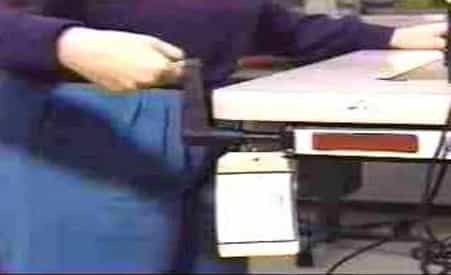
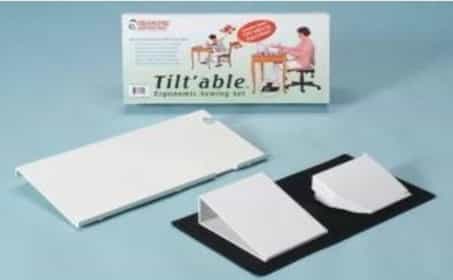
A good height for sewing tables is at or slightly above the elbow height. The height should be easily adjustable with the press of a button. Sewing tables can also be modified to meet the requirements of specific garments, machines, or operators by making the table smaller to allow carts to get closer to the sewing machine. Putting an extension on the table to increase its size can help to support the weight of larger garments or even act as an input location for the sewing table. Raising the edges of the table prevents the material or components from falling down. A sewing table tilted at 10° to 25° towards the operator, improves the visibility of the task and helps to keep the neck in a more upright position. The appropriate height of the table also gives the operator sufficient legroom.
Chairs
Common problems
The chair is a critical piece of equipment for sewing machine operators who work in a seated position. It can have a very large impact on the comfort of the worker and can affect the risk of muscle pain and injury.
Possible solutions
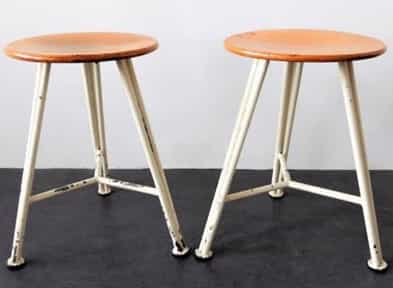
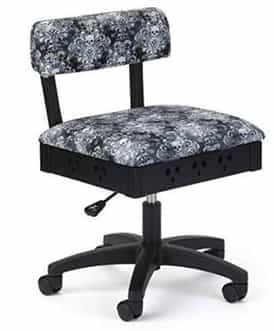
Adjustable chairs reduce the shoulder and neck pain of the operators. A custom-designed chair is adjustable in height, has no wheels to ensure that the operator stays firmly seated in place, has no arm support to interfere with the movements, and has a seat pan that slants slightly downward to support forward-leaning postures. The chair is also upholstered with a breathable cloth and foam appropriate for the high-temperature environment of the garment shopfloor.
For seating and standing work, the workstation height should be such that it allows workers to function with elbows placed at 90 degrees. This will reduce stress on the body. If the workstation is too low, the worker is forced to bend at the waist to reach the work being done. This puts stress on the lower back. If the station is too high, the worker is forced to lift his shoulders or move elbows away from the body to reach the work. This puts increased stress on the shoulders which may lead to injury. During seated work, if good back support is not present or used, the body is subjected to static postures, which results in constant use of the back muscles. Therefore, it is important to adjust the workstation in order to allow the worker to use the backrest. It is also important to adjust the worker’s chair for him to work in a comfortable body position.
Foot Pedal
Common Problems
Most sewing machine operators use one treadle, which controls the direction and speed of the sewing machine. Some operators use additional smaller pedals that lift the presser foot or cut the thread.
Possible solutions
One can increase the size of the treadles by placing a thin wooden board over the surface of the pedal, thus positioning it at the most comfortable position and angle for the operator. This way, if there is a requirement of a pedal, it will be at the same angle and position as the treadle, thus making it easily accessible by one of the feet. If only one foot is being used, a footrest should be located at the same height and angle as the treadle. Pedals for standing operators have to be close to the floor in order to support his body weight over both feet. The pedal could also be moved so that the operator is able to rotate between activating the pedal with his right or left foot.
Knee switches and hand controls
Common problems
The knee switches are often not conveniently located for the operator.
Possible solutions
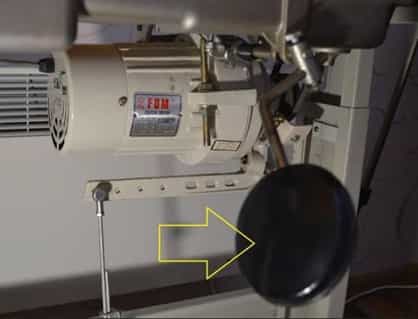
Place the knee switch at a convenient position for the operator so that it rests very close to the leg, just above the knee, and ensure that it is also well-padded. Make sure that the controls are located at a place that does not have any obstruction. In addition, controls should activate with a light feather touch even from different angles.
Lighting
Common problems
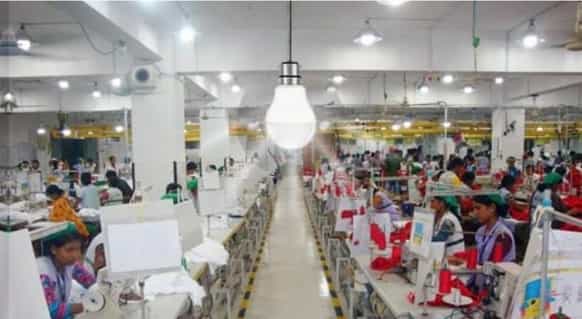
Without proper lighting, an operator may be encouraged to adopt poor postures in order to see his work better and may subsequently strain his eyes or be less productive. Lighting requirements may vary depending on the task, fabric, and individual preferences.
Possible solutions
Ensure that there is good general lighting and task lights are provided to the operators who desire them or have visually demanding tasks. The task lights should have a “goose-neck” so that the lights can be directed to the work area. Lampshades should have ventilation holes, but wherever necessary, these could be covered so that the light is not directed through these holes towards the operator disturbing his concentration.
Button Holing Machine
- Button holing machines are primarily variations of zigzag lockstitch machines or zigzag chain stitch machines with clamp feed systems for feeding material. Similar to button sewing in earlier generations of buttonholing machines, the x-y direction movement of fabric clamp was controlled by cam-follower driven mechanism, resulting in long machine setup time during changing of the shape of the button
- Nowadays, the x-y direction movement of fabric clamp is controlled by microprocessor-based drives, which require no physical change of cam. With the press of a button, different shapes of buttonholes can be made in the same
- One very important change from the past is no change of blade required for different lengths Earlier with the change of length of buttonhole cutting blade size was also required to be changed; this resulted in machine downtime. Now one small size blade does the cutting by multiple cutting strokes along the length of the button.
- Auto-lifter is present in many models that use a new stepping-motor system reducing operator fatigue. It is also possible to change over the stroke of the auto-lifter from a one-step stroke to a double-step stroke, which offers easier positioning of a material on the machine.
- In the past there was clear difference between straight buttonholing and eyelet buttonholing machines, while the straight buttonhole machines are lockstitch type with cutting happening after sewing of buttonhole, eyelet buttonhole machines were chainstitch machines with the cut-before or cut-after mechanism. However, with electronic shape control mechanism and having multiple blade options in one cutting block, straight buttonhole machines are offering unlimited choices.
- Other important features that improved the quality and performance of buttonhole are separate upper and lower thread tension control mechanism, tacking or stabilising stitch around the cut, etc. and ergonomic and user-friendly features like integrated LED-sewing light, semi submerged sewing head,
- The “active tension” (electronic thread tension mechanism), enables not only duplicating the same sewing conditions with ease but also of ensuring upgraded seam quality with
- One very important change from past is no change of blade required for different length of Earlier with change of length of button hole cutting blade size was also required to be changed; this resulted in machine downtime.
Now one small size blade does the cutting by multiple cutting strokes along the length of button.
- Select the machine carefully based on the product one is doing presently and also keeping the future expansion plans in mind since the machines come with variety of specifications to handle varied designs and usability. The speed of the sewing button hole can vary between 3600 – 4200 SPM with the maximum width of 4 mm – 5 mm. The length of the button hole may vary from 6 mm – 70 mm in various models available in the market, while 30 – 51 patterns are provided in the system of the operation panel as standard for easy changeover of pattern.
- Some button holing machines are equipped with basting stitch mechanism, which is effective for button holing on elastic materials such as knits. Due to the free programming possibility and a sewing field of 6 mm x 70 mm, the fields of application are unlimited. The fine adaptation of the button hole to various materials is done at the touch of a
- The optimized sewing kinematics guarantees an excellent stitch pattern, even with difficult Some brands not only allow a longitudinal, but also a transversal installation so that an easy change of a long and crosswise button holes can be made. Generally, the upper and lower thread trimmers were driven by one motor.
- However, in some brands and models, the upper and lower thread trimmers operate independently. Almost every brand offers an alternate cutting device for a clean cut without pulling (chopping cut mechanism) the
INTEGRATED SEWING
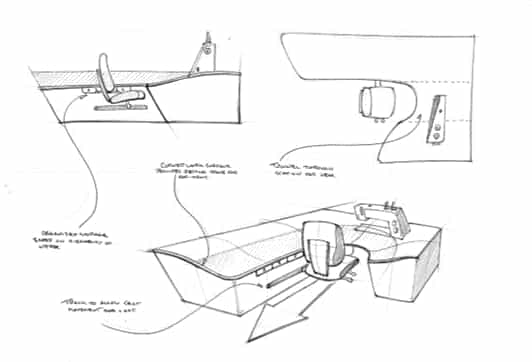
Focus
- Integrating seat, work surface, and
- Maximizing functional work
- Optimizing ergonomics of the work
- Focus Sitting and standing
Features
- Integrated seat with repeatable ergonomic
- A sloped ergonomic work surface forms around the user.
- Large supportive work
SITTING AND STANDING SEWING
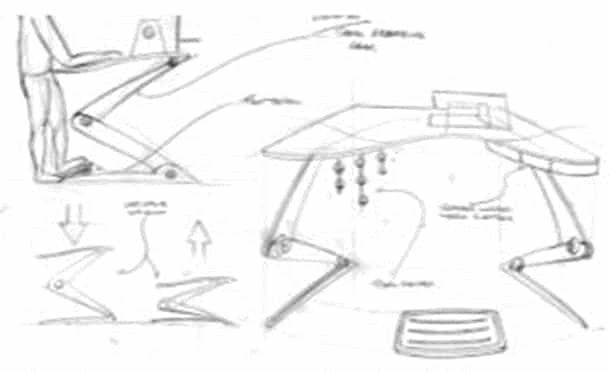
Focus
- Sitting and standing functionality
Features
- Shock absorbing
- Height adjustable
- Integrated spool
- Contoured work surface to fit the body
LONG ARM BASED SEWING
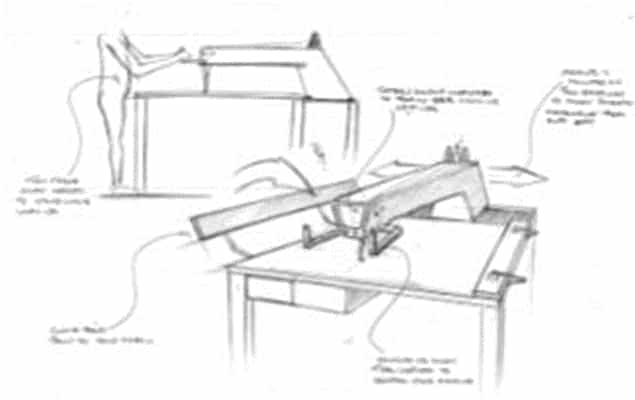
Focus
- Standing over the work
- Trigger-based sewing machine
- Sewer holds the machine, not the fabric
Features
- Fabric clamping
- Standing work
- Two-axis movable sewing Dual handles for better control.
Ergonomically Designed Sewing Workstation
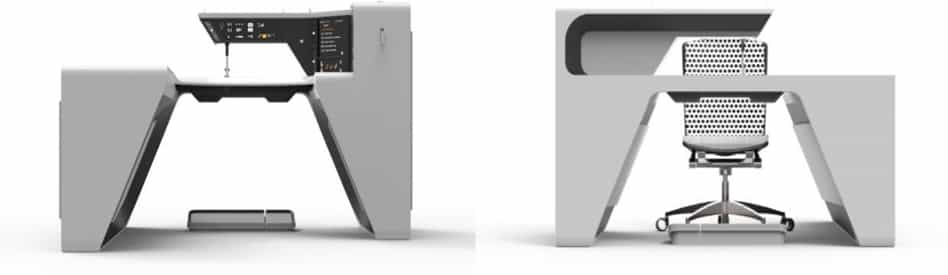
The form is an innovative new ergonomic sewing workstation that reduces the risk of sewers developing repetitive stress injuries while creating a safe environment that fosters greater productivity.
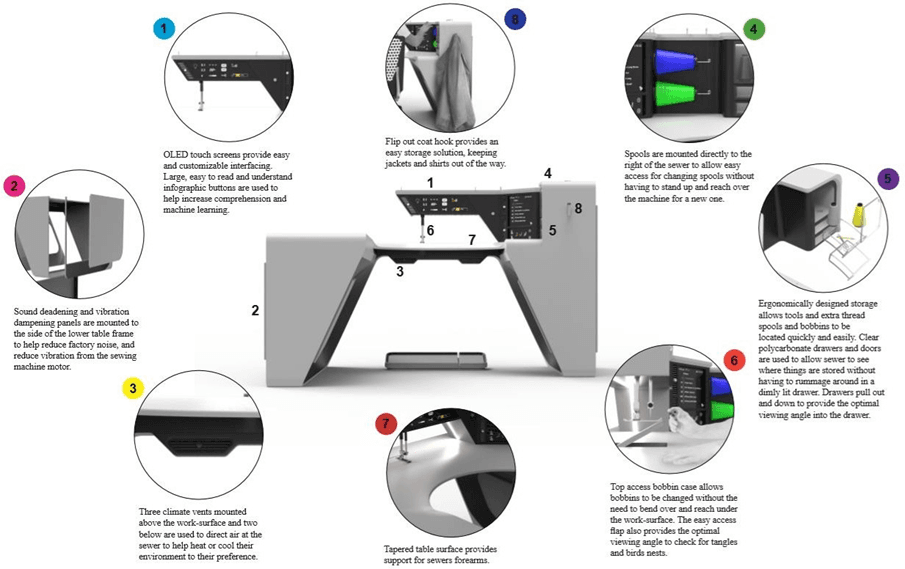
Explanation:
- The form uses a set of risers to allow the work surface to be adjusted between sitting and standing positions several times over the course of the workday. This adjustment plays a major role in the reduction of repetitive stress injuries in both the upper body and the lower body, while also contributing to improved general
- This user-centered methodology has also been applied to several other areas of the workstation, such as the layout of the storage and the positioning of the spools which are in easy, the comfortable reach of the sewer.
- The form incorporates a unique climate control system to allow sewers to adjust the temperature of their working environment to a setting that keeps them
- Advanced, programmable settings and reminders allow businesses to send order numbers directly to the sewers and perform updates and maintenance on the machine remotely, while also allowing sewers to create individualized work plans with reminders to help prevent them from remaining in a static position for an extended period of
- A form is an essential tool for sewers and businesses, that allows them to create a safer and more productive work environment while improving the overall quality of life for the
- Benefits:
- The form provides an easily adjustable and adaptable work environment that allows the sewer to take control of their workstations, making themselves more comfortable, while also reducing the risk of developing repetitive stress injuries
- The form provides an organizational hierarchy that is superior to other products on the market, allowing sewers to easily find and reach the tools they need without compromising their long term
- Form creates an environment that keeps sewers more comfortable through the use of a unique industry-leading climate control system which in turn allows sewers to be more productive while working.
- The form takes advantage of modern OLED touch screens to allow sewers to quickly and easily interface with the workstation while keeping energy consumption to a minimum
- The form uses sound deadening and vibration-absorbing panels attached to its frame structure that absorbs factory and machine noise, while also helping to reduce the vibrations that are common in current sewing workstations.
- The form incorporates homey customizable touches such as an integrated coat hook, color, and brightness-adjustable sewing arm integrated light, as well as a message center that allows sewers to send and receive messages and calls while on break
- Form takes advantage of the latest in direct drive sewing motor technology allowing the unit to keep energy consumption levels to a minimum, while also reducing vibration and noise
- Form incorporates a surface access bobbin hatch that allows users to easily gain access to the bobbin without having to bend over and reach under the table
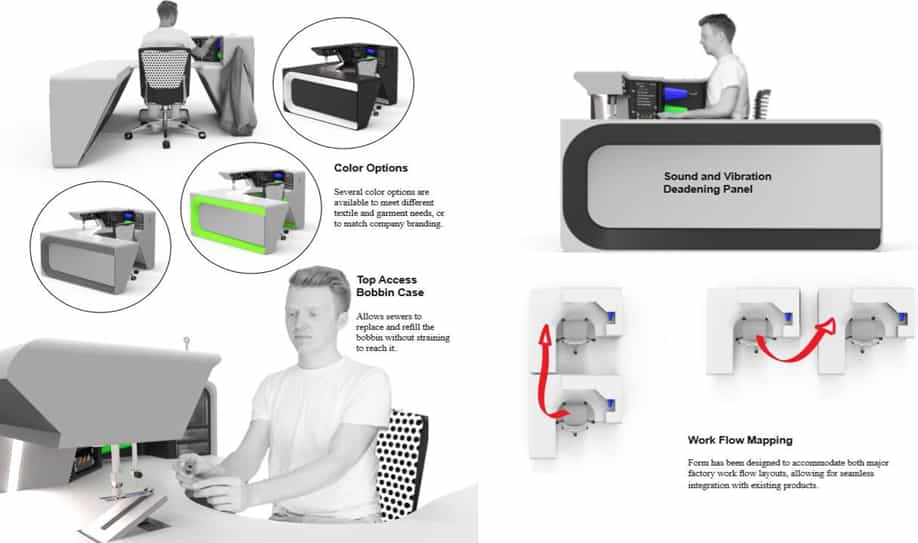
Designed for The User
The form is the first industrial sewing workstation designed with the user in mind. It focuses on providing the optimal position for the sewer while increasing their comfort through the use of its climate control system, and ergonomically designed storage solutions. Sound and vibration are kept to a minimum through the use of sound deadening and vibration-absorbing material incorporated into the frame of the workstation. Form prioritizes the long-term health and safety of its users and does not compromise.
Easily Adjustable and Customizable
The form uses electronic riser motors to allow users of all abilities to easily raise and lower the workstation to their desired height. Both lighting and climate can be controlled simply through the three OLED touch screens that display clearly the current settings and can provide help menus if needed to assist in adjustments.
Intuitive and Culturally Integrated
The form incorporates three large OLED touch screens that allow users to easily access settings and customize menus. Large, easy-to-see and understand infographic buttons are used to help improve user interfacing and to make learning how to use the machine a quicker process. Region-specific languages and formats can be chosen from the settings menu, and several control layouts are available and easily customizable based on user preference.
Universally Accessible
Form’s full range of adjustment allows users of all shapes and sizes to get comfortable while sewing. Once the sewer has become comfortable with the workstation, menus and button layouts can be customized based on the job at hand and the skill of the sewer.
Improved User Ergonomics
The large range of motion in table height allows users to choose from an infinite number of positions based on their height and whether they would prefer to sit or stand. The ergonomically tapered sewing surface allows sewers to rest their forearms on the table surface while sewing, reducing stress on the sewer’s hands, forearms, arms, shoulders, and necks. The improved placement of storage in the command center allows users to reach all of their required tools without having to reach outside of the comfortable range for the average user; improved placement of the thread spools as well as the bobbin case also aids in preventing awkward motions that may lead to repetitive stress injuries over time.
Versatile Form
Provides ample table surface to allow projects of all sizes and shapes to be supported while sewing, while also conserving factory floor space. Form’s powerful direct drive motor is also capable of sewing a variety of fabrics, from light silky fabrics to heavy leather and synthetic fabrics.
Sustainable Materials Used
The form incorporates sustainability into many aspects of its design; however, it also uses a variety of environmentally responsible processes and materials in its production. The form is constructed from a recycled aluminum frame, and uses a PaperstoneTM work surface, while the command console is constructed from recycled glass-filled ABS plastic. Where recyclable materials can’t be used, strong durable materials are used to increase the lifespan of the component and reduce the likelihood of replacement.
Reliable/Durable/Easy to Maintain
Through the use of tough materials and modular components, Form provides a solid platform for a long-lasting reliable workstation. Modularity allows old components to be easily replaced and new components to be added, making it easy to keep an old machine running, or to upgrade to a new standard. The form also takes advantage of the latest sensors and software to be able to keep track of its maintenance schedule and to perform updates and maintenance remotely.
Affordable
The form is priced to compete with some of the more expensive workstations on the market; however, Form becomes much more affordable when the increased production of its sewer is taken into account and the reduction in paid disability leave a business may have to take on when sewers develop repetitive stress injuries.
Integration of New Technology Form is the only industrial sewing workstation to incorporate advanced order and messaging software accessed through three large OLED touch screens. Sewing data can be logged virtually and updates and maintenance can be performed remotely. The form is also the only industrial sewing workstation to incorporate a state-of-the-art climate control system, allowing users to set the temperature of their workstation to their preferences.
Opportunities for differently-abled
Why Does Disability Matter?
- Because over 20 million people (according to the 2001 census), who constitute 13 percent of the country’s total population, suffer from disability in India. However, the WHO pegs this figure at 70 million – you probably already employ someone in this category and they may be among your employees.
- Because discrimination against disabled people is not just unethical, it’s also unfair and a huge waste of human
Important Facts
- 73 percent of the business houses do not have any CSR policies to employ physically-challenged people in their organizations
- A 1999 survey by the National Centre for Promotion of Employment for Disabled People revealed that the private sector employs a mere 0.28 percent of people with disabilities, while the public sector employs 54 percent. Multinational Corporations had hired only 0.05 percent of disabled people in India.
- With the ratification of the UN Convention on rights of persons with disabilities, the Indian government has declared its commitment to apply rights-based legislation to the private sector soon
The Business Case
Many organizations are already addressing disability, often as part of a wider diversity strategy. They recognize that diversity within their workforce brings many business benefits and is a central factor in determining efficiency, productivity, and overall business success. The case for including disabled people in a diverse workforce is compelling. Employers of disabled people have consistently found that:
- They have been able to widen the pool of recruits, which is especially useful where the skill pool is limited or employees are in short Disabled people are as productive and reliable as other employees
- Disabled people in work tend to have better attendance records, stay with employers longer, and have fewer accidents at work.
- Most only require minimal and very basic adjustments at work
- Staff morale and team development are enhanced when businesses are seen to be equal opportunity employers
- They have been able to retain employees’ valuable skills, experience and expertise within the organization, at the same time avoiding the costs of recruiting and training new people
- Organizations accessible to disabled customers are more accessible and appealing to all consumers and stakeholders.
Interviewers must ideally have attended disability equality or awareness training. They should be briefed on disability and the organization’s disability recruitment policy. A suggested briefing is given below. In addition, interviewers may also find it useful to have training on ‘communicating confidently with disabled job applicants’. Disability briefing for interviewers:
- not to discriminate against disabled
- not to treat disabled people less favorably than they would treat others, for reasons related to disability
- not to discriminate in the way arrangements for and offers of employment are made and as a result of any physical features of the premises used for employment purposes
- to make reasonable adjustments to remove any substantial disadvantage faced by someone with a disability or health condition, which might include allowing appropriate support or facilities for the disabled person at interview and more interview time if there is a discussion of issues related to disability and reasonable adjustments at the interview
Workplace Adjustments
- There are three kinds of reasonable adjustment that might need to be considered, individually or in combination:
- Working arrangements – The way the work is done, managed or
For example, if it is not possible or extremely difficult for the employee to attend meetings away from the site, providing teleconferencing or videoconferencing is an alternative. Another example would be to allow the employee to work from home some or all of the time, in order to avoid or cut down on the health impact of traveling.
- Working hours – Altering the times the employee works to accommodate time off for treatment or This could vary from full-time flexible working to part-time or job-share arrangements.
- Other arrangements – This type of reasonable adjustment includes everything from equipment and personal assistance through to major alterations to the, In reality, the most common reasonable adjustments in this category are likely to be such things as orthopedic chairs, ergonomic keyboards, and computer software.
Examples of workplace adjustments
- The design of a particular workplace makes it difficult for someone with a hearing impairment to hear because the main office is open-plan and has hard This substantial disadvantage, caused by the physical features of the workplace, is removed by relocating the person in an adjoining section, which is situated in a smaller, carpeted room.
- Before a man who is deafblind starts a new job he comes into the workplace to see what is required. He and his employer agree on what needs to be done. His employer arranges for paperwork to be provided in Braille, trains colleagues to communicate with him, and provides disability equality training to his manager and colleagues
- It may be appropriate to get advice and information on support from an Access Consultant or a Disability Employment Specialist. This should be done as soon as possible because the process for securing adjustments can be slow. It may also be necessary for the disabled person to return to the workplace, prior to actually starting work, to ensure that adjustments are suitable and complete
Infrastructural Accessibility
One of the most important barriers is accessibility at the office that includes adjustment and modification of machinery and the adaptation of the work environment to provide access to the place of work, to facilitate the employment of individuals with disabilities. To make the office environment accessible, the ideal situation will be to have an environment that is universally designed. Taking a mainstream approach to disability will:
- Help you to anticipate adjustments that will be beneficial to many people, including those with disabilities and health conditions
- Save money on retrofitting
- Enhance your reputation as an advanced, disability-friendly, and proactive organization or business.
- Ensure consideration of disability becomes part of ‘business as usual.
Access Audits
An access audit is regarded as the first step towards improving accessibility. An Access audit is an important tool to identify barriers, within a building but also external areas such as play spaces, car parking, etc. The audit provides a “baseline” assessment against which initial recommendations can be made. With the results of the access report, service providers are better equipped to bring key personnel and management to specific meetings to discuss what they are able to achieve within short and long-term time frames.
The elements covered in an access audit depend on the type and nature of the environment and services under consideration. Buildings and sites vary considerably and, although there will be common elements between particular types, no two will be exactly the same. Generally, the elements covered in an Access audit include:
- Getting to the premises – access from road or car park, lighting, signage, surfaces, and street furniture
- Getting into the premises – entrance, steps, thresholds, doors, lobby/reception area, seating, and lighting
- Getting around the premises – corridors, doors, stairs, lifts, signage, floor surfaces, tonal contrasts, and lighting
- Using the services in the premises – toilets, washrooms, changing and bathrooms, bedrooms, eating areas, bar, room layout, lighting, heating, switches, handles, seating, furniture, telephone, alarm, health and safety issues, management and staff attitudes
- Exploring alternative ways of providing access to services – where a physical feature makes it impossible or unreasonably difficult for a service to be accessed. For example, offering a home service, installing a call bell for help at an approved height, providing a piece of equipment, or offering extra assistance from trained staff
- Getting out of the building in an emergency – fire exits, emergency routes, lighting, and warning systems and safe refuge.
- Communication systems – communication and instruction materials both printed and websites, training materials, manuals, instruction sheets, etc.
- A complete accessibility audit involves visiting the venue, completing an access survey, taking photographs, and discussing other access issues with the management. It is important to ensure that the appointed body commissioned has ample experience in access auditing. It is not enough for the auditor to be a registered architect, engineer, or building surveyor.
Assistive Devices
Assistive devices are technical tools or services such as alphabet boards, text telephones, or text-to-speech conversion software used to assist people with physical or emotional disorders in performing certain actions, tasks, and activities. These can be crucial to the functioning and performance of an employee with a disability at the workplace. Below are examples of the most commonly used devices
a) Assistive Listening Devices
Induction loop systems
Induction loop systems enhance communication for hearing aid users by reducing the background noise and amplifying useful information. There are various models available and options include portable, desk-top, under-counter, and discreet personal units, and kits that can be installed to cover individual workstations or entire meeting rooms.
Portable amplifier with headphones
The built-in or add-on microphones provide stereo sound amplification for general listening. It makes listening to conversations easier, whether in the cafeteria, in small groups, or in meetings. Some models come with an option to pick up sound from environments where an induction loop system is installed.
b) Computer Aids
With the help of some adaptations and specialist software, most people with vision impairments are able to use office computers independently. Following is a list of the commonly used aids to enhance the accessibility of computers in the office environment.
Screen magnification lens
Magnification lenses come as plastic sheets that can be placed in front of the computer screen, and offer various levels of magnification. Some models can be clamped in front of the computer monitor. However, the magnification quality achieved using the lens is not as good as the one achieved by using screen magnification software.
Large print keyboards
There are two large print keyboards available. There is a standard size keyboard available with large print on the keys, which is 400% larger letters compared to standard keyboards. The keyboards are available in black letters with white or yellow backgrounds and white letters with black backgrounds.
Voice recognition software
Voice Recognition Software enables the user to have an alternative to typing text into a computer. This is a possible solution for people who have difficulty with their hands or who have dyslexia and is not usually the recommended option for a person who is blind or partially sighted who can learn to touch type. This is because the combination of equipment that is required to make the voice in and voice out work together is expensive and requires extensive training.
- A few companies, with support from Disability Employment Specialists, have successfully tried hand-holding and supporting disabled employees through the induction This has assisted in the ongoing identification and resolution of issues until the disabled employee is comfortable in the new work environment.
- Care must be taken to encourage independence and confidence in the disabled person and to avoid causing resentment from other
- In some situations, it may be appropriate to assign another member of staff under a ‘Buddy System’ to support and mentor the new employee for a specified period of time. For example, some people experiencing a condition such as Asperger’s syndrome, a form of autism, may find it difficult to interact and communicate with other people.
- A reasonable adjustment might include (with the individual’s consent) briefing colleagues about the person’s needs and organizing a mentor or buddy in the workplace. Because people with Asperger’s often interpret written and verbal communication in a very literal way, it may be helpful to check back that someone has understood any new information or
Managing performance and disability
- In some organizations and businesses, the responsibility for performance and disability management lies with HR staff, a disability coordinator, or someone else with specialist knowledge. In most cases, however, responsibility will lie with a line manager who may not have the special skills and knowledge.
- For this reason, it is important to implement a standard, well-defined Disability management should be put into practice in all aspects of recruitment, selection, and employment, including performance. To do this effectively, you must also ensure that all your policies, procedures, and practices are supportive to both the process and to disabled people in the workplace. The disability management approach should all relate the factors that need to be considered, including:
- How the individual’s disability is showing or may show itself in the workplace
- How these effects can be removed by making reasonable adjustments
- How reasonable adjustments will be implemented and assessed for effectiveness
Disability management process
- Stage 1: Identify employees who need management or support related to disability.
- Stage 2: Initiate and manage the interview, assessment, decision-making, and review process. When managing a disability or a long-term health condition with a new employee, discuss with the person where adjustments are required and what these might be. This will involve:
- Examining the person specification and job description to identify key tasks and capability standards for that individual in that job
- Arranging assessments with specialists such as Access Consultant, Ergonomics Expert, and Disability Employment Specialist.
- Collating reports to interpret and evaluate assessments to decide which adjustments are reasonable and appropriate.
- Stage 3: Reasonable adjustments should be implemented and tested to evaluate their effectiveness for the individual in that particular job.
- Stage 4: Where no effective reasonable adjustment can be found consider redeployment as an alternative to dismissal.
Career Development
- One common mistake is to overlook someone with a disability for promotion to management or a supervisor position because they cannot carry out some of the tasks due to their impairment. It is best practice to carry out regular performance reviews to provide a chance to discuss whether someone could carry out the tasks associated with promotion or transfer
- Some disabled people may need help to develop confidence in their abilities to undertake management training or other promotional opportunities offered to When appropriate, provide targeted training specifically for disabled people, for instance, by offering proactive personal development if you want to encourage disabled people to apply for supervisor or management positions. In addition, consider making reasonable adjustments, perhaps by assigning some minor tasks of the role to another member of staff.
- It would probably be reasonable to swap some, which cause difficulties or are impossible, with other members of a team or This flexible approach means that you can capitalize on people’s abilities and not be held back by unimportant limitations.
Mentoring
- A mentor is wise and reliable Mentoring is a useful way to encourage and support people’s career development and can be particularly useful in providing an opportunity outside the usual line management relationship to build confidence and to explore areas of weakness confidentially.
- In some cases, it may be useful for the individual to be mentored by another disabled person, perhaps where that person has successfully moved up the career ladder. However, just because both people are disabled, they are no more likely to be able to relate to one another’s life experiences than people who are non-disabled. For this reason, all mentors, whether disabled or non-disabled, should go through disability equality training prior to becoming a mentor.
Buddy System
A buddy system is another type of mentoring, where a particular individual is assigned to look out for another.
- This could include working alongside someone while learning the job or providing someone to go to if there is a problem
- This is a useful type of support system both in the short and the long term for some disabled people. It will always be useful for a disabled person to know who to turn to if a problem arises and should prevent any problems from being ignored or becoming unnecessarily difficult.
- However, the support should be regularly reviewed so that dependency is not A planned withdrawal should be agreed upon and monitored.
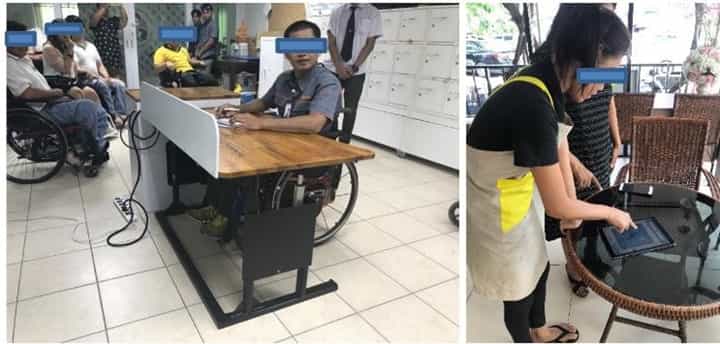
Possible Improvements
Tables
The work table is adjustable, up and down. The side filing cabinet has an adjustable storage compartment and a wall cabinet that is more easily accessible, and wheelchair users must check the wheelchair turning radius. The position of the electrical outlets should be inside tables and side cabinets. Hydraulic adjustments should be used rather than manual ones due to the low physical strength of the disabled. The price of furniture must be affordable. Recyclable material should be used to reduce costs. Moreover, there should be guardrails and barriers to prevent collisions and injuries.
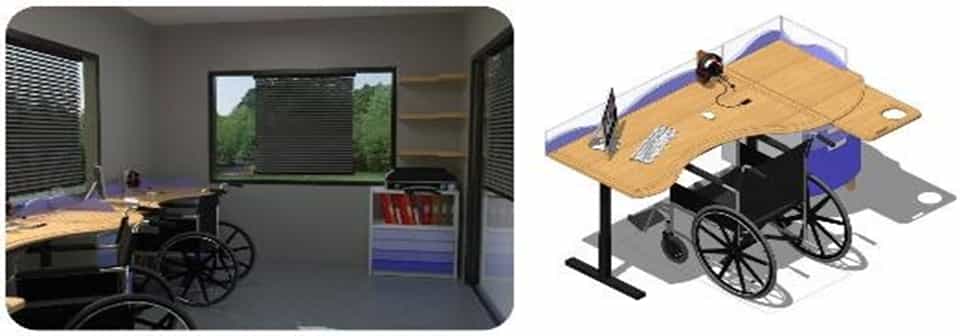
Design of a work table, side filing cabinet, and wall cabinet. The work table is adjustable, up and down. The side filing cabinet has an adjustable storage compartment and a wall cabinet that is more easily accessible.
The drawers
Handles of side cabinets should be recessed to prevent unwanted interaction with disabled people. Moreover, the visually impaired have difficulties retrieving objects from the bottom of cabinets, so these should be adjustable. Tabletops should have an easy-to-sign storage compartment, with signs or symbols for the visually impaired to recognize.
Wall cabinets
These are not suitable for visual impairment due to the danger of falling of objects. There should be Braille on the outside of the cabinets to identify the contents of the cabinets. It should be of their own design (see Figure: design of guardrails and barriers, electric switches, mobile and equipment storage compartments (for canes or slates) for the visually impaired).
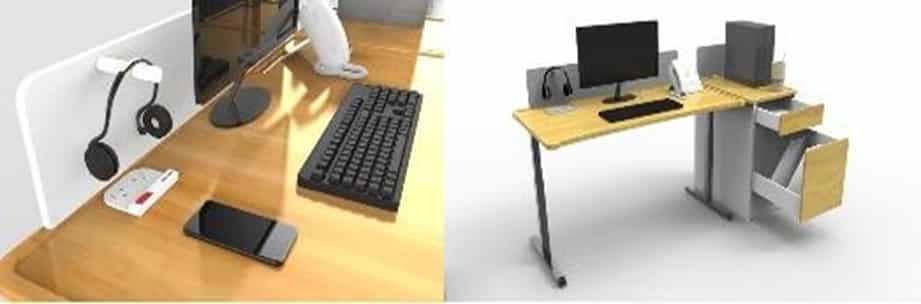
Design of guardrails and barriers, electric switches, mobile and equipment storage compartments (for canes or slates) for the visually impaired.
Smart device
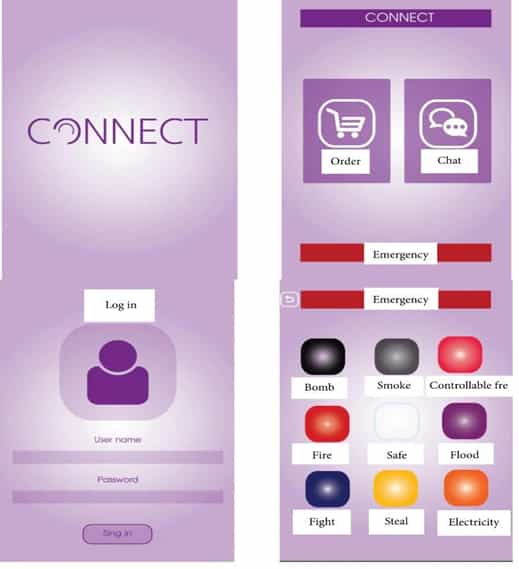
A portable, inexpensive, and easy-to-use device should be used to give instructions to the hearing impaired. Smartphones watches or accessories used in everyday life can be suitable for this purpose. Instructions given to the hearing impaired should be easy to retrieve in the event that they are forgotten. Moreover, its use should not excessively interfere while working with a trainer.
METHOD STUDY
Ergonomical innovations in Buttonholing Machine to increase efficiency and Simplifying the tasks
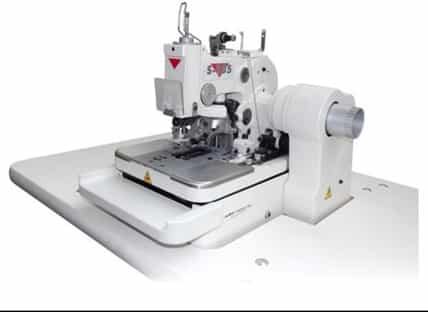
- The latest version of the mechanical eyelet buttonhole machine combines proven sewing functions of earlier models with new improved mechanisms. The result is an optimization of sewing quality, sewing speed, reliability, ergonomics, and noise
- The S-105 mechanical eyelet buttonhole machine is user-friendly with very simple adjustments of buttonhole type, buttonhole cutting, eye shape The S-105 is the only mechanical eyelet buttonhole machine offered with a submerged sewing head that allows the operator to handle the garment more ergonomically.
- This mechanical eyelet buttonhole machine is sewing open and flybar buttonholes with or without the eye at the speed of 1800 The buttonhole length is adjustable between 12-38 mm depending on the garment manufacturers’ requirements.
Machine Features
- High Sewing Speed up to 1,800 spm
- With speeds up to 1,800 spm, this is one of the AMF Reece’s fastest and most productive mechanical eyelet buttonhole machines. The daily productivity, based on an 8-hour shift, is about 3,300
Revolutionary Stop Motion
- The Roller Activated Stop Motion, also installed on the S-101machine, dependably positions the brake pad for a full revolution of braking every By absorbing much of the inertia prior to the stop, the life of the machine is prolonged and quality problems, such as double stops, are virtually eliminated.
- The machine spends more time sewing since components like the flyover and the eccentric cam are no longer needed and fewer adjustments are required
Semi-Automatic Lubrication System with Oil level indicator
- The S-105 is equipped with a full drip oil wick lubrication system. By using wicks to carry oil to the critical parts of the machine, oiling is easier and less time
- The advantage of this system is that it eliminates periodic oiling downtime, reduces maintenance expense, and prolongs the machine
- An oil level indicator shows the operator or mechanic when the machine is low on oil, preventing the machine from the severe damage that can be caused by running a machine without the required minimum oil
Simple Buttonhole Adjustments
- All buttonhole adjustments such as buttonhole type, cutting selection (cut before, cut after, no cut), eye shape (eye, no eye) are easily adjusted by simple usage of levers and knobs
- Aluminum bedplate
- By using an aluminum bedplate instead of a cast-iron bedplate, the weight is reduced by over 1/3. The lighter bedplate reduces stress and wears, thus prolonging the life of the machine.
Submerged Sewing Head :
- The S-105 machine is supplied with a submerged sewing head that allows the operator to handle the garments more ergonomically and helps to reduce the noise level
Available Models and Applications
S – 105 AF
- Description: Adjustable Flybar model with cut before or cut after application, regular travel, regular eye 2,8 x 4,2 mm.
- Size Adjustment: 12-38 mm
- Applications: tailored clothing, outwear, vests and jeans
- Optional Accessories:
-
0008.4.875 Work Lamp 5511.0.002 Clamp Feet Protection Kit for Thin Material 0279.1.000 Gauge 4005.0.001 Looper – Single Thread 4005.0.005 Looper – Double Thread – thin. 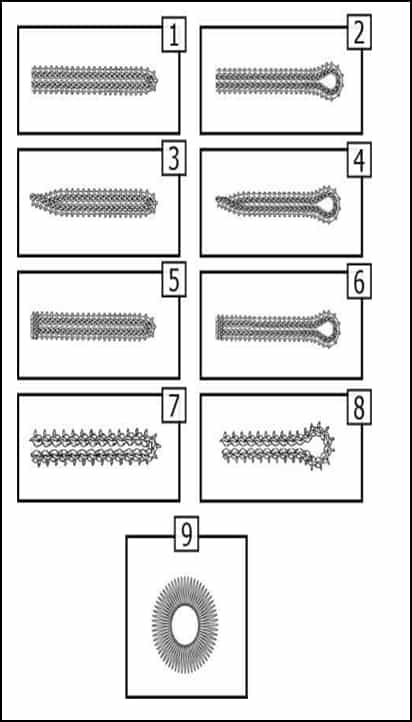
Type of eyelets 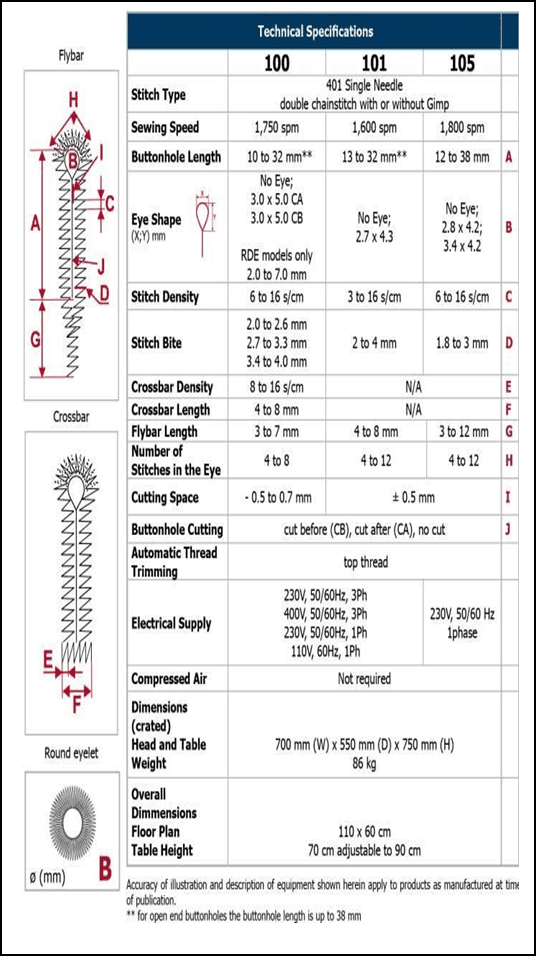
Eyelet technical specification 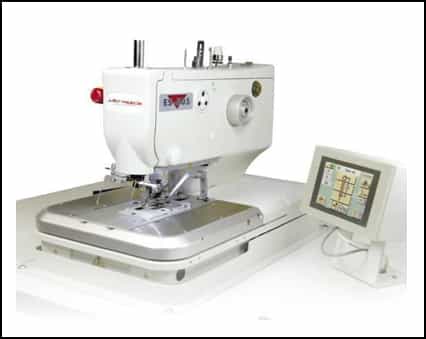
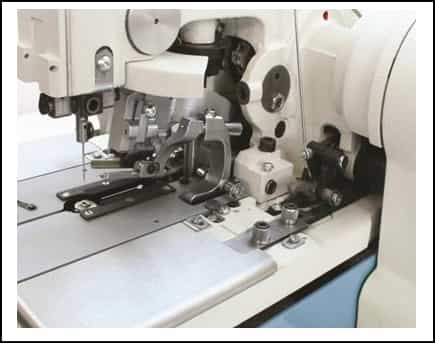
- The ultra-flexible, fully programmable electronic eyelet buttonhole machine incorporates the latest technologies and highest requirements to meet all manufactures’ needs. The electronic eyelet buttonhole machine combines the excellent traditional buttonhole quality performance with a new revolutionary machine design, four patented mechanisms, and currently the highest sewing
- All sewing parameters are very simply adjustable on a large full-color touch Ultra flexibility on men‘s suits is ensured by a specially designed ULTRAFLEX model where lapel buttonholes are cut fully or partially and are sewn in one sequence with jacket front buttonholes. The ES – 505 electronic eyelet buttonhole machine is available in a wide range of models including the indexer model recommended for sewing multiple buttonholes on jacket sleeves or fly fronts.
Main Features
- Currently, the fastest machine available, running at 2,700 spm
- Unbeatable sewing speed adjustable from 1,500 spm to 2,7000 spm directly from the touch screen display. Different sewing speeds can be programmed at the start/stop position, around the eye, and in the crossbar finish to ensure excellent sewing quality even on difficult materials
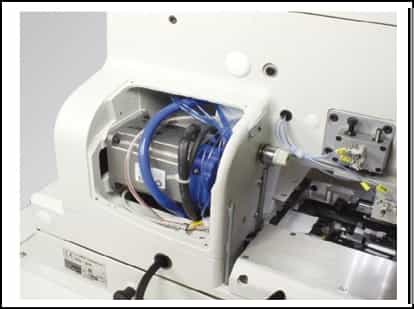
The new modular design of the sewing head with integrated sewing motor
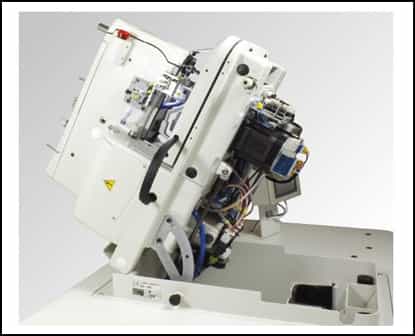
- The new concept of the sewing head enables sewing in the vertical or horizontal direction and provides the operator with larger handling space in the sewing The new, stronger main drive increases machine performance and is integrated into the sewing head. The sewing head can be fixed onto the sewing table or sup¬plied as submerged according to the customer’s preference.
New patented balancing and sewing drive mechanism
- Developed to increase the machine performance, lifetime and decrease the machine
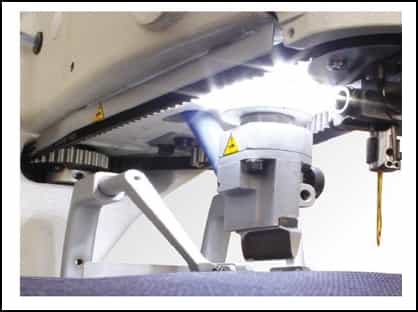
Incorporated Round LED Lights
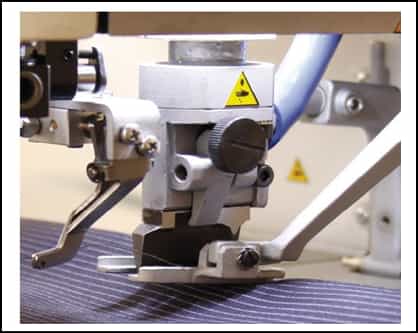
- Incorporated LED sewing lights around the cutting block eli¬minates darker spots in the sewing area and provides opti¬mum light conditions while working on the machine.
No need for mechanical adjustments when changing the stitch bite
- A new technical solution for the stitch bite, including the two basic widths, 1.9 and 2.7 mm, ensures that the full stitch bite range is now controlled from the touch screen display only.
The new vertical cutting system instead of standard lever cutting
- The vertical cutting improves the buttonhole cutting in its whole length. The lever cutting system has been replaced by a pneumatically controlled vertical cutting mechanism applying the same pressure throughout the buttonhole length and providing the operator with clean and reliable buttonhole cutting on all types and multiple layers of material.
Independent thread tension of all threads
- The needle, looper, and gimp thread can be separately adjusted from the sewing head without the need to tilt the sewing This system improves the sewing quality on different fabrics and therefore the final buttonhole appearance.
High-Resolution Full-Color Touch Screen Display
- 7” LCD high-resolution touch screen display is fixed onto the machine table and incorporates new sewing functions. The use of easily understood symbols makes the machine very easy to operate, minimizing training time.
Pneumatic System Controls
- Pneumatic system controls are used for the clamping, spreading, cutting of the material, thread nipper, stitch bite, suction system, and also for the thread tension of needle, looper, and gimp thread
Cycle Sewing
- The cycle sewing allows up to 21 different buttonhole combinations to be sewn in 47 different programs. The operator can set the machine to sew any of the required buttonhole styles, e. to cover all buttonhole applications on a formal jacket. All settings can be done easily by the operator on the touch screen display.
New longer clamp feet
- The machine is equipped with new longer clamp feet. The longer arms improve the material handling and provide the operator with more space when clamping the sewn Availability of different types of clamp feet for a variety of applications ensures optimum fabric clamping.
Ultra Flexibility on Men’s Suit Applications
- The Ultraflex is a specially designed model for buttonhole applications on men’s suits where lapel buttonholes are cut fully or partially. It increases the operator’s productivity since both lapel and jacket front buttonholes are sewn and cut in one sewing sequence without changing any knives and cutting
- All buttonhole parameters including the required cutting position and cutting length of the lapel buttonhole is easily saved in the machine can be optionally equipped with an optical sensor system to automatically alternate between the lapel and front buttonholes.
- The Ultraflex is supplied with LTT-long tail thread trimming The machine is equipped with the thread nipper to ensure that the first buttonhole stitch is formed properly.
Applications and Sewing Patterns
- The ES 505 machine can be used for a wide range of applications that are suited to all needs of the clothing manufacturer, both large and small. This machine can handle all types of garments ranging from light to heavyweight materials including denim and The applications of the machine can be found on formal menswear, ladies‘ wear, jeans, casual trousers, and other outwear.
- The ES 505 machine can sew a variety of buttonhole shapes with or without gimp including the round Depending on the manufacturer requirements, up to 99 different stitching patterns can be set in the memory of the machine.
- When sewing the round end finish, the operator can set two different start positions, which are either in the first row or in the eye. When the eye start is selected, the finished buttonhole looks much cleaner since the trimmed thread ends are covered by the button, especially on the trouser applications.
Thread Trimming Mechanisms and Model Classifications
The SE-505 basic models are classified according to the trimming mechanisms into AF, CT, LTT models.
AF (Adjustable Flybar)
The model is recommended for all buttonhole applications that require only top thread trimming. The size of buttonholes is adjustable from 10 to 50 mm, in increments of 1 mm.
CT (Cord Trim)
Model for use on jeans, trousers, or other applications here all threads need to be trimmed from the very end of the buttonhole. Buttonhole sizes ranging from 14 to 35 mm can be seen by using the two different clamp sets.
LTT (Long Tail Trimmer)
The model is used mostly on tailored clothing when the end of the buttonhole is left open and the long tails of the threads are pulled through the buttonhole to be tacked in a separate operation. Buttonhole length can be set from 13 to 38 mm. All threads are trimmed with a 20-30 mm tail depending on the buttonhole size.
Optional Accessories
Thread Nipper
The thread nipper holds the top thread at the start of the sewing cycle to ensure that the first stitch is formed properly especially on difficult fabrics. The new concept of the thread nipper gives a more reliable grip of the top thread. The thread nipper makes two different movements – vertical and horizontal, to bring the thread closer to the needle. It is standard on the LTT and Ultraflex models and optional on the AF and CT models.
Hand Start Control or only One Pedal
These can be optionally ordered to operate the machine. The hand starts control is recommended for standing operators and is placed on the machine bedplate. All standard machines come with 2 pedals (each pedal has one position) – left pedal to close the clamp feet and right pedal to start the sewing. The optional pedal can execute both steps.
Optional cutting knives, cutting steels, clamp feet, throat plates, work mats
Optional cutting knives, cutting steels, clamp feet, throat plates, work mats are available and can be ordered from our spare parts department if required.
Electronic Eyelet Buttonhole Machine ES-505
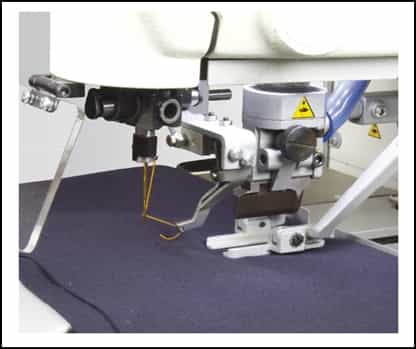
Button Holing Indexers
- In the case of buttonholing indexers, the operator is only required to place the shirt front panel parallel to the adjuster clamp, which fixes the neckline of the front panel with the help of two sub-clamp catches Similarly, the bottom edge of the front panel is fixed and aligned via the same mechanism.
- After the placement is complete, the sewing head automatically stitches the buttonholes at preset positions with the help of a belt conveyor fixed in the machine which keeps on feeding the fabric and making buttonholes adjusting the distance on the front placket of the shirt. After the buttonholes have been sewn, the shirt front slips towards the back of the machine with the help of the third sub clamp catch plate and an automatic stacker comes from the back of the machine to catch the piece over it and place it on a stand
- This synchronization of the adjuster clamp, belt conveyor, and stacker is made possible with the help of the touch screen control panel, in which the parameters of stitch density, stitch length, buttonhole length and fixing distance between buttonholes are defined before commencing operations of the machine
- All the above automation work exactly in the same manner in the case of button sewing indexers, except that the buttons are fed by a button feeder which keeps delivering buttons to the sub clamp for placement of the sewing head
Benefits of installing buttonholing indexers
Buttonholing indexers not only carry advantages like automatically and accurately sewing buttonholes in lockstitch mode but also have improved cycle time for sewing a buttonhole according to a recent time study done on different types of buttonhole indexers and ordinary buttonhole making machines. Various findings came out in this study regarding sewing cycle time which has been presented in Table 1.
Table 1: Total cycle time of different buttonhole indexers along with ordinary buttonholing cycle time
Serial No.Machine TypeMachine ModelPick the piece (in secs)Buttonholing (in secs)Dispose of (in secs)Total Time (in secs)Actual Time per buttonhole (in secs)
1 GTN GTN1054BHVJ 17 21 (for 6) 3 41 6.83 2 Duerkopp Adler buttonhole Indexer Class 841 9 32 (for 7) 2 43 6.14 3 Zoje ZJ-ACF-S-5780 5 9(for 3) 1 15 5 4 Juki AC-172N-1790 4 20(for 5) 3 27 5.4 On the basis of the total cycle time values from pick to dispose which emerged for various buttonholing indexers, it was found out that there has been improvement in actual sewing time that is needle downtime resulting in an increase in average production. The percentage improvements have been summed up in Table 2.
Serial No. Machine Type Serial No. %improvement in actual sewing time %improvement in total cycle time Average Production per hr in terms of no. of buttonholes made Shirts completed/hr with 6 buttonholes 1 GTN GTN1054BHVJ 51.3% 22.3% 458 76 2 Duerkopp Adler buttonhole Indexer Class 841 36.5% 30.1% 509 85 3 Zoje ZJ-ACF-S-5780 58.33% 43.1% 626 104 4 Juki AC-172N-1790 44.44% 38.63% 579 96 5 Sakho SA-5800 BH 39.81% 29.92% 507 84